 Now
more than ever, we’re all looking for ways to conserve both money and
fuel. Whether we’re taking fewer trips or carpooling with family and
friends, saving resources is a top priority. It was that thinking that
led to the creation of ecoRoute – our free software update for
compatible nüvi products that allows users to find more fuel
efficient
routes when navigating and even track their fuel usage. With ecoRoute,
you may be able to save gas and money by adopting smarter driving
habits and finding more fuel-efficient routes.
Now
more than ever, we’re all looking for ways to conserve both money and
fuel. Whether we’re taking fewer trips or carpooling with family and
friends, saving resources is a top priority. It was that thinking that
led to the creation of ecoRoute – our free software update for
compatible nüvi products that allows users to find more fuel
efficient
routes when navigating and even track their fuel usage. With ecoRoute,
you may be able to save gas and money by adopting smarter driving
habits and finding more fuel-efficient routes.
Select Fuel-efficient Routes
 With
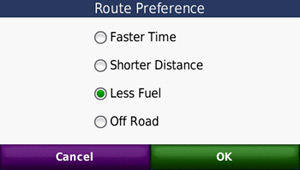
ecoRoute, users will have a “less fuel” option as a routing preference.
When selected, nüvi will determine if more fuel efficient routes
exist
based upon road speed data and vehicle acceleration data for a given
route.
With
ecoRoute, users will have a “less fuel” option as a routing preference.
When selected, nüvi will determine if more fuel efficient routes
exist
based upon road speed data and vehicle acceleration data for a given
route.
Get Fuel and Mileage Reports
Through ecoRoute’s Fuel Report and Mileage Report, drivers can focus on their habits even when they’re not behind the wheel. Fuel Report tracks fuel usage over time, and Mileage Report monitors mileage and fuel usage on a per-trip basis. In addition, Mileage Report makes it easy for business travelers to keep track of distance traveled for company reimbursements. You'll have a detailed report for each trip and the miles driven. You can also customize your nüvi by entering your car’s fuel economy and the current price of gas.
- Compatible Products: NUVI 205, 205W, 255, 255W, 265T, 265WT, 275T
NUVI 1200, 1250. 1260T
NUVI 1300, 1350, 1350T, 1370T, 1390T
NUVI 1490T
- Installation process for Garmin ecoRoute
1. Click below to download the appropriate version of WebUpdater Software to your computer.
2. Connect your compatible nüvi to your computer.
3. Launch WebUpdater.
4. Once WebUpdater is running and your nüvi is connected, you will see software update options.
5. Select ecoRoute from the list of update options.
6. Select “Finish”
7. Your nüvi will then re-start and ecoRoute will be available for use.